An app for each platform
The coach can run the session from the phone, while the surfer follows it on the watch. With the desktop app you can do video analysis on your computer, with or without internet.
CoachDesktop app Beta
CoachPhone app
 iPhone · coming soon
SurferWatch app

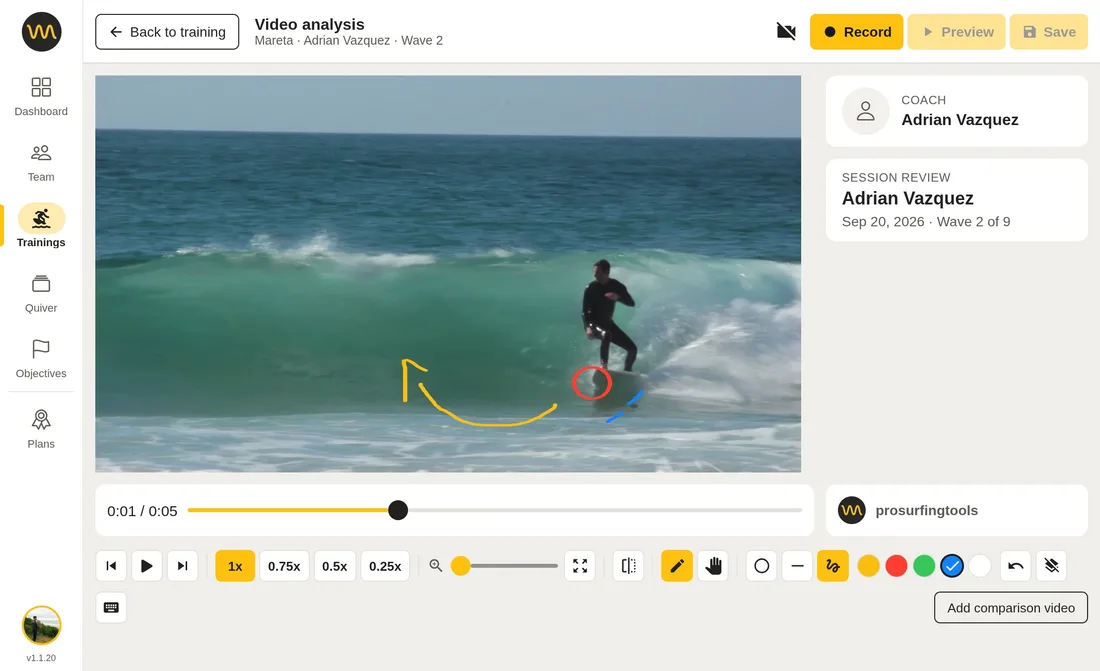
Desktop app Beta
The whole app on your computer, built to work offline: trainings, heats, scores and notes, plus video analysis that needs no connection, for remote spots and surf trips.
Video analysis needs the Pro + Video Analysis plan. See plans
In beta: it is new and still improving, so expect some bugs and missing screens. Trainings, waves and notes sync to your account; the videos you analyse are kept on this computer, and you can upload them if you want. Report problems to contact@prosurfingtools.com.
Installing on Linux
- Download the file with the button above.
- Make it executable: right-click it, open Properties and allow it to run as a program, or run
chmod +x Prosurfingtools-*.AppImagein a terminal. - Double-click it and sign in with your Prosurfingtools account. It adds itself to your applications menu.
It checks for updates each time it opens and installs them itself. If it does not start, install FUSE, which the app needs (on Ubuntu 22.04 and later, the libfuse2 package).
Phone app
The coach's app on the beach. Start the heat clock, log every wave, add notes or scores and message your surfers' watches. In competition heats it also keeps priority, totals and what each surfer needs. If the signal drops, it keeps working and syncs later. You can also upload session videos and analyse each wave.
Coaching from the beach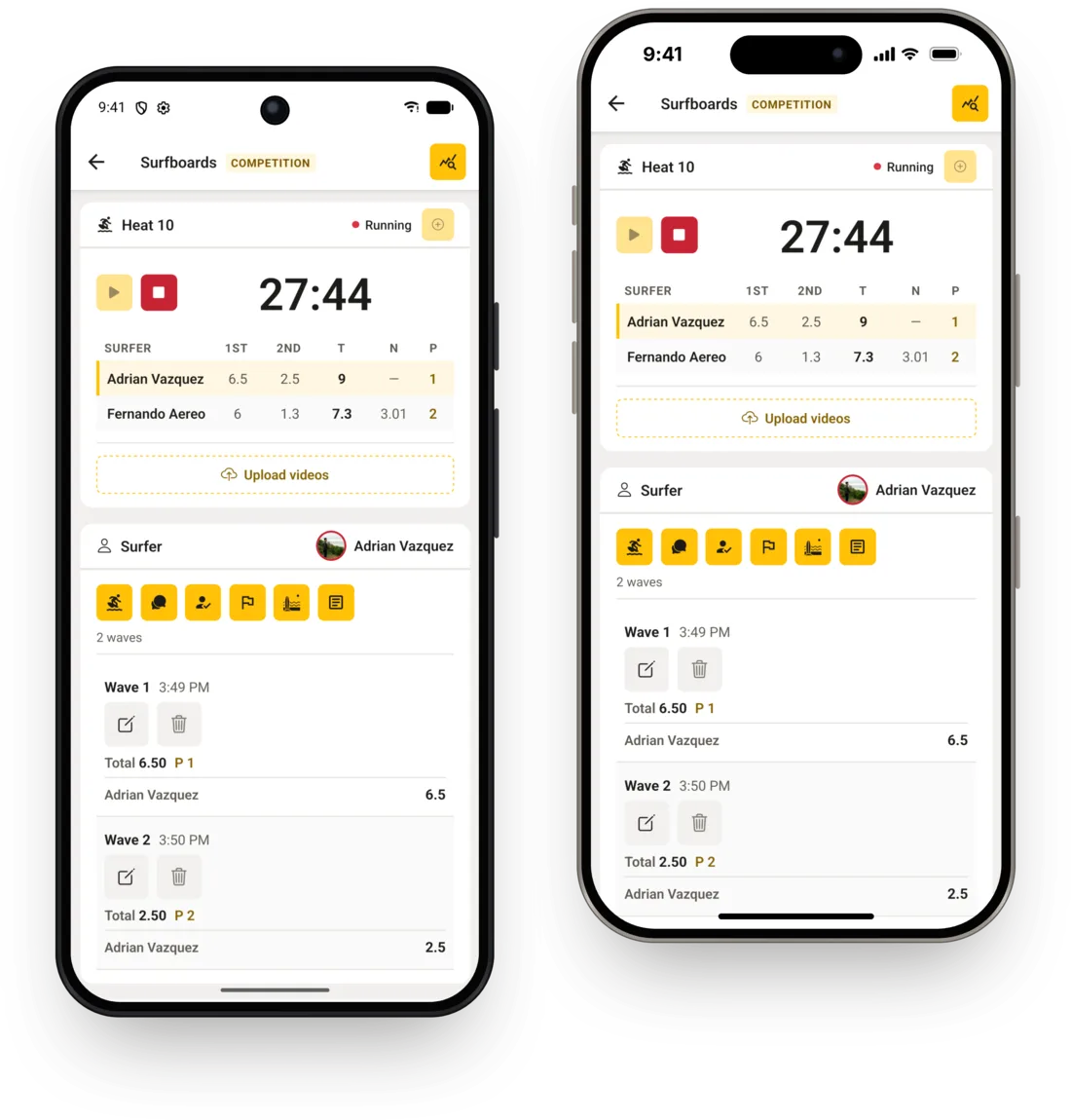
Watch app
The surfer's app, worn in the water. Every session shows the heat clock and the coach's messages. Competition heats add live scores, heat position, priority and the score needed to take the lead. Coaches don't need a watch.
For Wear OS watches and Apple Watch.
What the watch shows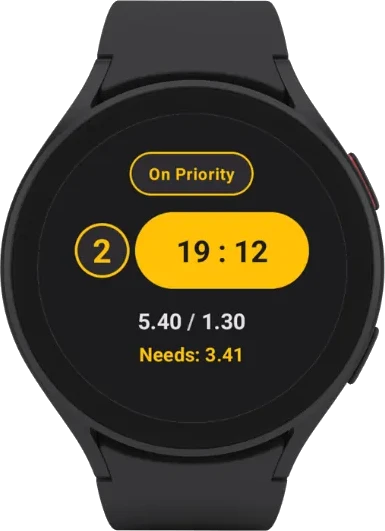

Apps or website?
The same account everywhere, and video analysis on the website, phone and desktop. The website needs no install and has every setting; the apps are built for where you use them.
| Website | Phone app | Desktop app | |
|---|---|---|---|
| Install | Nothing, any browser | Google Play (iPhone soon) | Linux, Mac, and Windows |
| Best for | Planning, settings, team and subscription | Running sessions on the beach | Coaching and video analysis at a computer, even with no signal |
| Without internet | Needs a connection | Keeps working, syncs later | Everything works, video analysis included |
| Video analysis | Online: upload the session, AI finds the rides | Online: upload the session, AI finds the rides | On your computer, even offline: AI finds the rides and you upload the waves you choose |
Questions
- What does beta mean for the desktop app?
- It works for real sessions, but it is new: expect occasional bugs and some screens still to come. Trainings, waves and notes are stored in your account, so the website always has them; the videos you analyse are kept on your computer, and you can upload them if you want.
- Does video analysis really work without internet?
- Yes. Opening footage, reviewing rides, cutting clips and recording feedback all run on your computer. Sign in online once; after that the video tools keep working offline for 7 days from the last time the app checked your Pro + Video Analysis plan. Trainings and notes sync when you reconnect, and videos upload only when you choose.
- Which videos can I open?
- Camera files in H.264, as MP4 or MOV. HEVC (H.265) files, which many phones record by default, can't be opened yet.
- Is there an iPhone version?
- Not yet: the iPhone app is on its way. Until then, the website works in any browser on iPhone and iPad, and the watch app is already on the Apple Watch.
All desktop versions Beta
Every build of the desktop app, for when the button above picked the wrong one or you are downloading for another computer.
Linux64-bit PCs (x86_64)
1.1.20 · 290 MB
Download for LinuxMac (Apple silicon)Macs with Apple M1 or later
1.1.20 · 288 MB
Download for Mac (Apple silicon)Mac (Intel)Older Macs with an Intel processor, no AI ride detection
1.1.20 · 307 MB
Download for Mac (Intel)Windows64-bit PCs with Windows 10 or 11
1.1.20 · 201 MB
Download for Windows
Run your next session from the beach.
Set up your first training and invite your surfers.
Register for free · No credit card required